





Uninstalling User's Guide
Solution
The installed User's Guide is not uninstalled by uninstalling the printer driver. User's Guide can be uninstalled using the following procedure.
IMPORTANT
A user without administrator rights cannot uninstall the printer driver. Be sure to log on as a user with administrator rights before the uninstallation.
If you are not sure about the permissions, ask your computer administrator.
1. Insert the "LBP3010/LBP3018/LBP3050 (or LBP3100/LBP3108/LBP3150) User Software" CD-ROM supplied with the printer into the CD-ROM drive.
If the CD-ROM is already in the drive, eject the disk and re-insert it into the drive.
NOTE
- If you are using Windows Vista and the [AutoPlay] dialog box appears, click [Run AUTORUN.EXE].
- If you are using Windows Vista and the [User Account Control] dialog box appears, click [Continue].
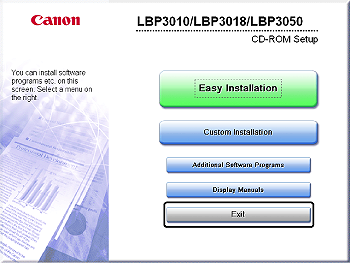
- If CD-ROM Setup does not appear, display it using the following procedures. (The CD-ROM drive name is indicated as "D:" in this manual. The CD-ROM drive name may differ depending on the computer you are using.)
- If you are using an operating system other than Windows Vista, select [Run] from the [Start] menu, enter "D:\English\MInst.exe", and then click [OK].
- If you are using Windows Vista, enter "D:\English\MInst.exe" in [Start Search] under the [Start] menu, and then press the [ENTER] key on your keyboard.
2. Click [Additional Software Programs].
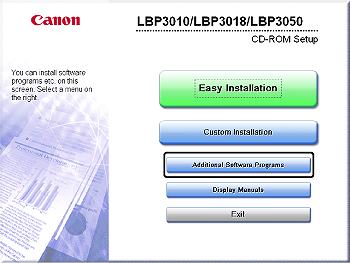
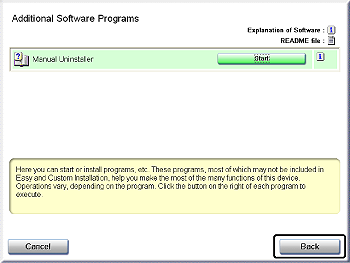
3. Click [Start] for [Manual Uninstaller].
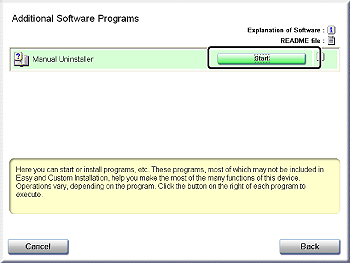
4. Click [Uninstall].
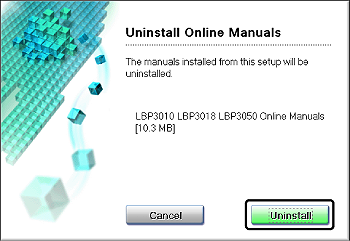
Uninstallation starts. Please wait a moment.
5. Click [Exit].
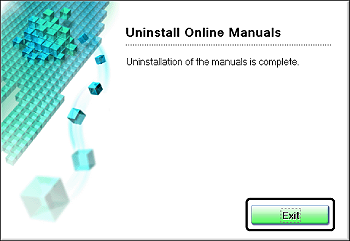
6. Click [Back].
7. Click [Exit].