







How to delete all screen displays
Solution
If you want to delete all screen displays such as on-screen displays, follow the operations below.
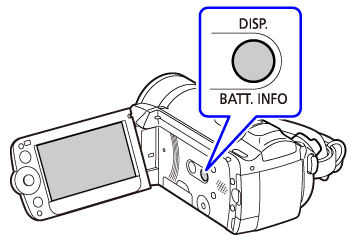
To delete on-screen displays, press the < DISP. > button several times.
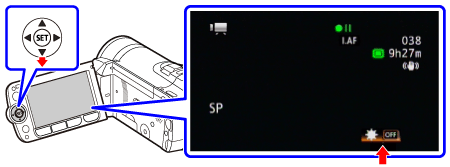
To delete the joystick guide in the lower-right corner of the screen, press <  >.
>.
>.
To delete the Onscreen Markers and Audio Level Indicator, follow the instructions below.
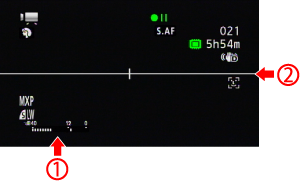
 Audio Level Indicator
 Marker
1. Press the <  ( FUNC. ) > button.
( FUNC. ) > button.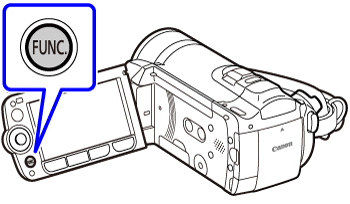
2. Select <  > [
> [  MENU ], and press <
  ( SET ) >.
> [ MENU ], and press < ( SET ) >.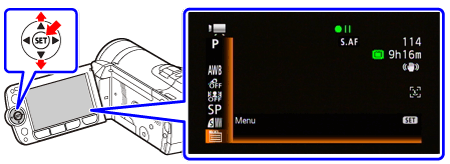
3. Select <  > [
> [  ( Camera Setup 3 ) ].
> [ ( Camera Setup 3 ) ].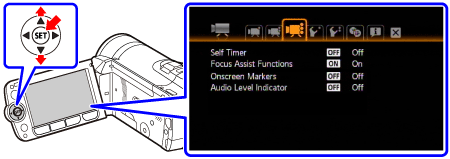
4. Select < > [ Onscreen Markers ] or [ Audio Level Indicator ], and press < ( SET ) >.
> [ Onscreen Markers ] or [ Audio Level Indicator ], and press < ( SET ) >.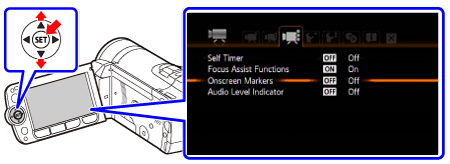
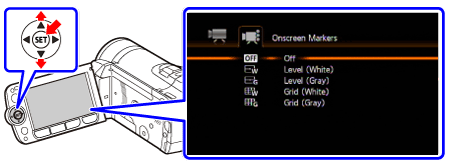
5. Select < > [ Off ], and press < ( SET ) >.
> [ Off ], and press < ( SET ) >.[ Onscreen Markers ]
[ Audio Level Indicator ]
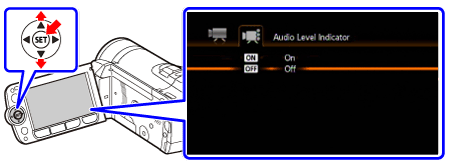
6. Press the < ( FUNC. ) > button to close the menu.
( FUNC. ) > button to close the menu.