





Usable Paper
Solution
The following shows the paper sizes that can be used with this printer.
 : Available
  : Unavailable
| Paper Type | Setting for [Paper Type]*1 | Paper Size | Paper Source | 2-sided Printing | ||
| Multi-purpose Tray | Cassette 1 | Cassette 2 (Optional) | ||||
| Plain paper*2 (60 to 90 g/㎡) | [Plain Paper] (Default) [Plain Paper L]*3 | A4 | | | | |
| B5 | | | | | ||
| A5 | | | | | ||
| A6 | | | | | ||
| Legal | | | | | ||
| Letter | | | | | ||
| Executive | | | | | ||
| 16K | | | | | ||
| Custom size paper | *4 | *5 | *5 | | ||
| Heavy paper (91 to 150 g/㎡) | [Heavy Paper 1] | A4 | | *6 | *6 | *6 |
| B5 | | *6 | *6 | | ||
| A5 | | *6 | *6 | | ||
| A6 | | *6 | *6 | | ||
| Legal | | *6 | *6 | *6 | ||
| Letter | | *6 | *6 | *6 | ||
| Executive | | *6 | *6 | | ||
| 16K | | *6 | *6 | | ||
| Custom size paper | *4 | *5 *6 | *5 *6 | | ||
| Heavy paper (151 to 163 g/㎡) | [Heavy Paper 2] | A4 | | | | |
| B5 | | | | | ||
| A5 | | | | | ||
| A6 | | | | | ||
| Legal | | | | | ||
| Letter | | | | | ||
| Executive | | | | | ||
| 16K | | | | | ||
| Custom size paper | *4 | | | | ||
| Transparency | [Transparency] | A4 | | | | |
| Letter | | | | | ||
| Label | [Label] | A4 | | | | |
| B5 | | | | | ||
| A5 | | | | | ||
| A6 | | | | | ||
| Legal | | | | | ||
| Letter | | | | | ||
| Executive | | | | | ||
| 16K | | | | | ||
| Custom size paper | *4 | | | | ||
| Index Card | [Envelope] | Index Card | | | | |
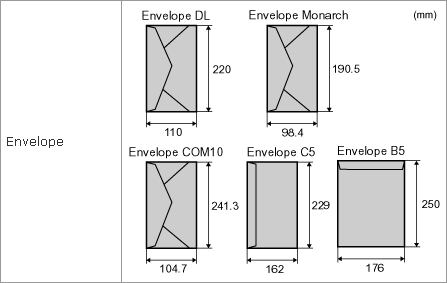
| Envelope | [Envelope] | Envelope COM10 | | | | |
| Envelope C5 | | | | | ||
| Envelope DL | | | | | ||
| Envelope Monarch | | | | | ||
| Envelope B5 | | | | | ||
*2 Recycled paper can also be used.
*3 If the printed paper curls (the printed side curls outward) when printed with [Plain Paper] selected, select [Plain Paper L]. You may not be able to use "Plain Paper L" depending on the version of the printer driver.
*4 You can load custom size paper that is 76.2 to 215.9 mm wide and 127.0 to 355.6 mm long.
*5 You can load custom size paper that is 105.0 to 215.9 mm wide and 148.0 to 355.6 mm long.
*6 You can use heavy paper of up to 120 g/㎡.
IMPORTANT
About print speed
- The print speed may drop depending on the paper settings for the size, type, orientation, and number of copies.
- When you print the paper whose length is 269.4 mm or less continuously, the print speed may drop gradually.
Precautions for paper
- See "e-Manual" (HTML manual) in the CD-ROM supplied with the printer.
When using labels or envelopes
- Using the following types of paper may result in paper jams that are difficult to clear or may result in damage to the printer.
- Peeled labels or partly used labels
- Coated labels that are easily peeled off from the backing sheet
- Labels with uneven adhesive
- Envelopes with fasteners or snaps
- Envelopes with address windows
- Envelopes with adhesive on the surface
- Wrinkled or creased envelopes
- Poorly manufactured envelopes in which the glued parts are uneven
- Irregularly-shaped envelopes
NOTE
Printable area
- See "e-Manual" (HTML manual) in the CD-ROM supplied with the printer.
Envelope sizes
- The envelope sizes are as follows.