






The camera does not respond even if I press the buttons (Easy Mode)
Solution
If the camera does not respond when you press the buttons, check whether the camera is in <Easy> mode ( ).
).
).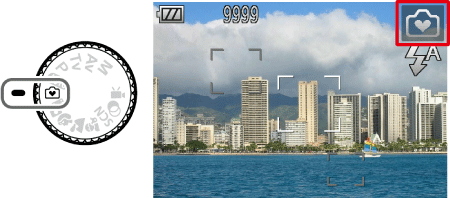
In <Easy> mode (), operational instructions are displayed on screen and buttons other than the ones below are disabled to prevent certain operations from being performed by mistake. This mode makes it possible for beginners to take pictures and to view the pictures they have taken with confidence.
), operational instructions are displayed on screen and buttons other than the ones below are disabled to prevent certain operations from being performed by mistake. This mode makes it possible for beginners to take pictures and to view the pictures they have taken with confidence. ... Can be used
  ... Button either does not exist on this model or is disabled
| <Zoom Lever> | <Flash> Button ( ) ) | <Movie> Button ( ) ) | <Playback> Button ( ) ) | <Single Image Erase> Button ( )*1 )*1 | |
| | | | | |
| PowerShot SX230 HS | | *1 | | | *2 |
| PowerShot SX150 IS | | *1 | | | |
| PowerShot A3300 IS PowerShot A3200 IS PowerShot A2200 PowerShot A1200 | | | | | |
*2: Images can be erased by pressing the <Directional buttons> downward