









Setting the flash (Slow Synchro Function)
Solution
Have you ever tried taking a picture with a nightscape in the background only to have the background come out dark and unrecognizable? If you use [Slow Synchro], you can shoot both the subject and nightscape clearly. This section describes how to set [Slow Synchro].
CAUTION
- Using Slow Synchro increases the chances for camera shake. Use of a tripod is recommended.
- The following explanations are provided based on the assumption that the [Shooting Mode] is set to [Program AE] (
 ).
). - If you use flash in any of the following shooting modes, images will be shot under the [Slow Synchro] (
 ) setting.
- [Landscape] ( ), [Night Snapshot] (
 ), [Sunset] (
 ), [Creative Light Effect] (
 ), [Night Scene] (
 ), [Long Shutter] (
 )
)
), [Night Snapshot] (), [Sunset] (), [Creative Light Effect] (), [Night Scene] (), [Long Shutter] ()- To set [Slow Synchro], it is required to preset the [Shooting Mode] to one of the following settings.
- [Program AE] (), [Aperture priority] ( ), [Stitch Assist] (
 )
)
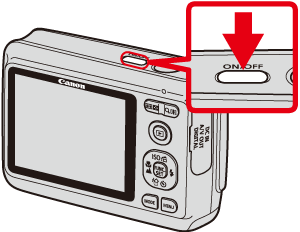
), [Aperture priority] (), [Stitch Assist] ()1. Press the <Power> button on the camera.
2. Press the <Flash> ( ) button or the right <directional button> ([Flash]).
) button or the right <directional button> ([Flash]).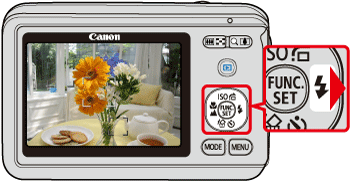
3. The following screen will appear on the LCD monitor.
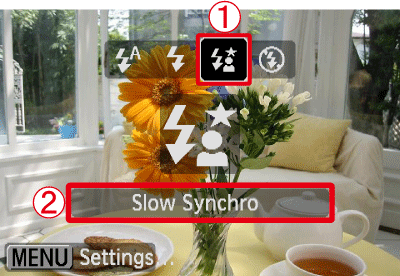
 Operate the <directional buttons> left or right to select the [Slow Synchro] ().
 Make sure to select [Slow Synchro].
4. If the following icon is displayed on the monitor*, this completes the setting process.
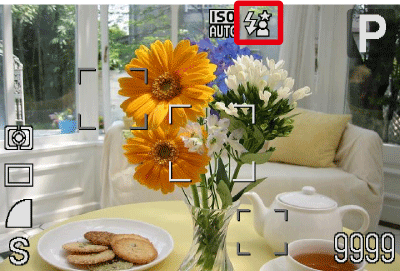
* The icon display location differs depending on the model being used.