









How to change Control Ring functions (PowerShot S100)
Solution
You can change the functions assigned to the <Control Ring> so that these settings will be easier to operate.
NOTE
If the <Control Ring> settings are changed, the <Control dial> settings are changed as well.
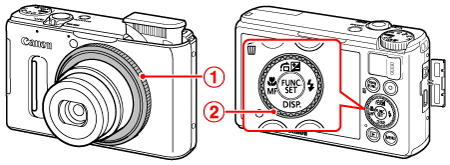
 <Control Ring>
 <Control dial>
1. Turn on the camera.
2. Press the <RING FUNC.> ( ) button.
) button.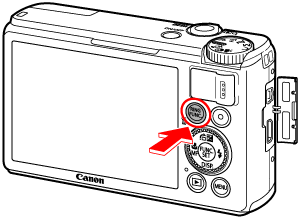
3. The following window appears.
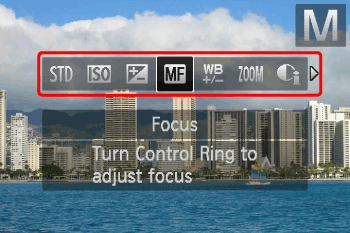
Press the <RING FUNC.> () button or operate the <directional buttons> left or right to choose an option.
) button or operate the <directional buttons> left or right to choose an option.After the selection is made, press the <FUNC./SET> ( ) button.
) button.4. The following window appears.
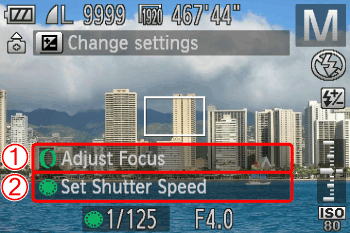 The function assigned to the <Control Ring> appears. The function assigned to the <Control dial> appears.
The functions you can assign to the control ring are different depending on the shooting mode.
| Assignable Function | Shooting mode | ||||
[Manual] | [Aperture Priority] | [Shutter Speed Priority] | [Program] | ||
[Default Control] | Control Ring | Av | Av | Tv | ISO |
| Control Dial | Tv | - | - | - | |
[ISO speed] | Control Ring | ISO | ISO | ISO | ISO |
| Control Dial | Tv, Av* | Av | Tv | - | |
[+/- (Exp.) / Tv] | Control Ring | Tv | +/- | +/- | +/- |
| Control Dial | Av | Av | Tv | - | |
[Focus] | Control Ring | You can use the manual focus. | |||
[White Balance] | Control Ring | You can correct the white balance. | |||
[Step Zoom] | Control Ring | You can use the step zoom. | |||
[i-Contrast] | Control Ring | You can set i-Contrast. | |||
[Aspect ratio] | Control Ring | You can change the aspect ratio. | |||
[Custom] | - | You can assign functions to your liking. | |||
- Av: aperture value, Tv: shutter speed, ISO: ISO speed, +/–: exposure compensation.
- With [Focus] (
 ), [White Balance] (
 ), [Step Zoom] (
 ),
),
[i-Contrast] ( ) and [Aspect ratio] (
 ), the functions assignable to the<Control Dial> are the same as with [ISO speed] (
 ).
).
) and [Aspect ratio] (), the functions assignable to the<Control Dial> are the same as with [ISO speed] ().* Press the < directional buttons > upward to switch between setting Tv and Av.