









Setting Up the FAX
Solution
To use the fax features of the machine, you can enter the fax settings through the Easy setup.
Press the MENU  button, then select in the order of Setup > Device settings > FAX settings > Start Easy setup or Easy setup > OK button or Start setup.
button, then select in the order of Setup > Device settings > FAX settings > Start Easy setup or Easy setup > OK button or Start setup.REFERENCE
Use the  button to select the item, then press the OK button.
button to select the item, then press the OK button.Easy setup starts up.
Follow the on-screen instruction to complete the settings in accordance with the operating environment.
- Connect to a Telephone Jack
Connect the machine to a telephone jack with the supplied telephone line cable.
The connector is labeled  on the back of the machine.
on the back of the machine.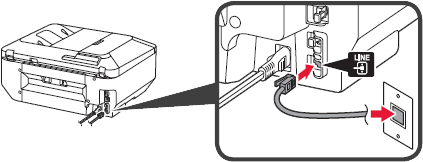
REFERENCE
- A basic connection method is shown in this figure.
- Users in Europe: If you prepare your own telephone line cable, be sure it is a 6-wire telephone line cable.
- Connect to a Telephone
When connecting a telephone or an answering machine, remove the Cap, then connect a telephone or an answering machine with a telephone line cable.
The connector is labeled  on the back of the machine.
on the back of the machine.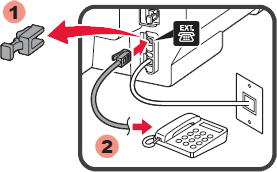
REFERENCE
- Do not use a telephone jack line duplexer.
- Users in UK: Use a B.T. adapter for connection as required.
For the details of other settings, refer to the [ Specifying the Basic Settings for Faxing ].