









A lamp lights even though the flash is set to [Off]
Solution
Even if the flash is set to [Off], a lamp may be activated when you press the shutter button halfway in low-light conditions. This lamp, called the AF-Assist Beam, only lights up to help you focus, and the flash will not fire during shooting.
It is possible to deactivate the AF-Assist Beam in some shooting modes.
IMPORTANT
The position and shape of the operation buttons, screens displayed, and setting items may differ according to the model you use.
The procedure for deactivating the AF-Assist Beam is explained below.
1. Press the <Power> button to turn the camera on.
2. Press the <MENU> button, and then choose the [Shooting] ( ) tab.
) tab.3. Press the [  ], [
], [  ] buttons to choose the [AF-Assist Beam], and then press the [
  ], [
], [  ] buttons to choose [Off].
], [ ] buttons to choose the [AF-Assist Beam], and then press the [ ], [ ] buttons to choose [Off].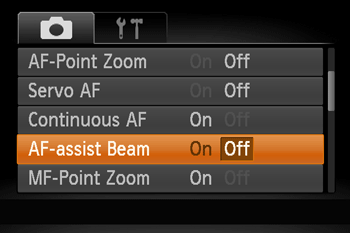
After you have changed the setting, press the <MENU> button to return to the shooting screen.
The AF Assist Beam can be set to off in the shooting modes shown in the table below.
| Model | Shooting modes in which the AF Assist Beam can be set to [Off] |
|---|---|
| PowerShot SX530 HS |  , , , , , , , , , , , , , , , , , , , , , , , , , , , , , , , , , , , , , , , , , , |
| PowerShot SX710 HS | ,,,,,,,,,,, ,,,,,,, ,,,,,,, ,,,,, ,,,,, , , |
| PowerShot SX610 HS | ,, ,,,,,,,,,,,,,,,, ,,,,,,,,,,,,,,,, |
| PowerShot SX410 IS | ,,,,,,,,,,,,,, |