









Setting ISO Speed (PowerShot SX620 HS)
Solution
Raise the [ISO speed] to use a fast shutter speed when you wish to reduce the effects of camera shake or avoid blurry subjects, or to turn the flash off when shooting in a dark area.
IMPORTANT
- The following section explains the setting procedures when the camera’s [Shooting Mode] has been set to [Program AE] (
 ).
).
1. Press the [Power] button to turn the camera on.
2. Press the [  ] button.
] button.
3. Press the [  ], [
], [  ] buttons to choose [
  ] in the menu, and then press the [ ] or [
  ] button.
], [ ] buttons to choose [ ] in the menu, and then press the [ ] or [ ] button.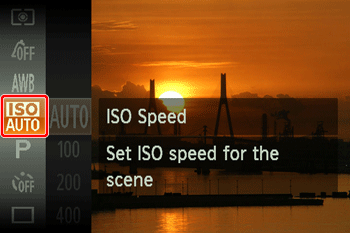

4. Press the [ ] or [ ] buttons to choose the desired ISO speed.
] or [ ] buttons to choose the desired ISO speed.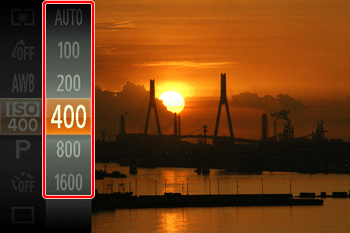
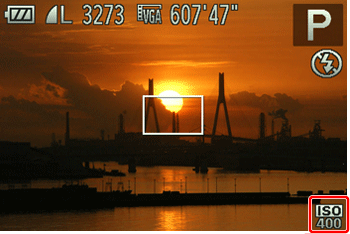
5. Press the [ ] button to complete the setting.
] button to complete the setting.The setting you selected will appear on the screen.
NOTE
- To view the automatically determined ISO speed when you have set the ISO speed to [AUTO], press the shutter button halfway.
- Although choosing a lower ISO speed may reduce image graininess, there may be a greater risk of subject and camera shake in some shooting conditions.
- Choosing a higher ISO speed will increase shutter speed, which may reduce subject and camera shake and increase the flash range. However, shots may look grainy.
 ... not available
| Function | Shooting Mode | ||||||||||||||||||
| ISO speed |  |  |  | ||||||||||||||||
 |  |  |  |  |  |  |  |  |  |  |  |  |  |  | |||||
 |  |  | |||||||||||||||||
| AUTO |  | | | | | | | | | | | | | | | | | | |
| 80 / 100 / 200 / 400 / 800 / 1600 / 3200 | | | | | | | | | | | | | | | | | | | |