









Configuring the ISO Speed Settings (PowerShot SX730 HS)
Solution
Choosing a higher ISO speed will increase shutter speed and thus reduce subject and camera shake in dark environments, and allow you to shoot without the flash.
IMPORTANT
- The instructions in this section apply to a camera with the [Shooting Mode] set to [
 : Program AE ].
REFERENCE
- The shooting modes in which the [ISO Speed] can be set are shown in the table below.
[ ] , [  ] , [
] , [  ] , [
] , [  ]
]
] , [ ] , [ ] , [ ]1. Press the power button.
2. Press the [  ] button.
] button.
3. Press the [  ] , [
] , [  ] buttons to choose [
  ] in the menu, and then press the [ ] button.
] , [ ] buttons to choose [ ] in the menu, and then press the [ ] button.
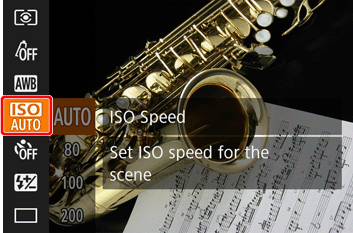
4. Press the [ ], [ ] buttons to choose the desired ISO speed.
], [ ] buttons to choose the desired ISO speed.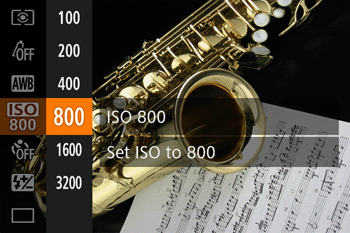
REFERENCE
- Set the ISO speed to [AUTO] for automatic adjustment to suit the shooting mode and conditions. Otherwise, set a higher ISO speed for higher sensitivity, or a lower value for lower sensitivity.
5. Press the [ ] button to complete the settings.
] button to complete the settings.- The option you configured is displayed on the screen.
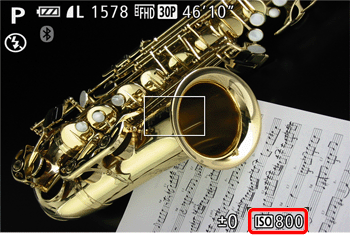
NOTE
- To view the automatically determined ISO speed when you have set the ISO speed to [AUTO], press the shutter button halfway.
- Although choosing a lower ISO speed may reduce image graininess, there may be a greater risk of subject and camera shake in some shooting conditions.
- Choosing a higher ISO speed will increase shutter speed, which may reduce subject and camera shake and increase the flash range. However, shots may look grainy.