









Capturing the Best Facial Expressions (Best Image Selection) (PowerShot SX230 HS / SX220 HS)
Solution
The camera takes five continuous shots, then detects various aspects of the shot such as facial expressions, and saves only one picture detected as the best.
IMPORTANT
- The recording pixel setting will be fixed at (
 ) 1984×1488.
 - The focus, brightness and white balance will be set with the first shot.
- Depending on the shooting condition, you may not obtain the expected result.
- [ISO speed] is set to [AUTO] (
 ).
). - [White Balance] is set to [AUTO] (
 ).
). - [AF Frame] is set to [Face Detect].
- The following functions cannot be used in the [Best Image Selection].
- [Self-Timer], [Flash] ( ), [Digital Zoom], [Date Stamp]
), [Digital Zoom], [Date Stamp]For functions other than the above that cannot be used, see the [Camera User Guide] bundled with the camera.
1. Set the <Mode Dial> to [SCN] ( ) and then press the <Power> button.
) and then press the <Power> button.2. Press the <FUNC./SET> ( ) button.
) button.3. The following screen appears.
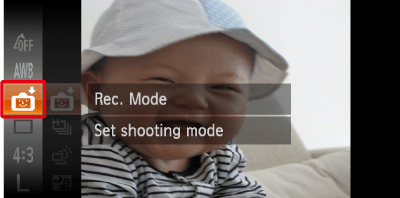
Operate the <directional buttons> up or down to select [Rec. Mode] (If no changes have been made so far, [Smart Shutter] ( ) will be displayed).
) will be displayed).Press the <FUNC./SET> () button.
) button.4. The following screen appears.
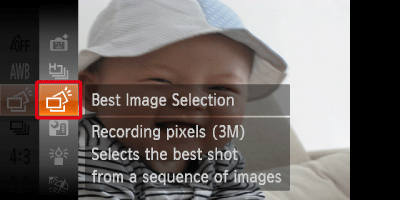
Operate the <directional buttons> up or down to select [Best Image Selection] ( ).
).
).Press the <FUNC./SET> () button.
) button.5. The following screen appears.
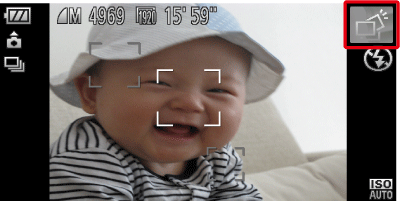
If the [Best Image Selection] ( ) icon appears on the top-right part of the screen, the setting is completed.
) icon appears on the top-right part of the screen, the setting is completed. When the <Shutter button> is pressed fully, the camera takes five continuous shots, and saves one picture only.