









How to set High-Speed Continuous Shooting (High-speed Burst) and Group Playback (PowerShot SX230 HS / SX220 HS)
Solution
You can shoot continuously at a maximum speed of approximately 8.1 images/second while the <shutter button> is pressed fully and held.
NOTE
- Recording pixels are fixed to 1984 x 1488 pixels (
 ).
). - Focus, exposure and white balance settings are set with the first shot.
- Depending on the shooting conditions, camera settings and the zoom position, the shooting speed may slow down.
- As the number of images increases, the shooting interval may take longer.
- [ISO speed] is set to [AUTO] (
 ).
). - The main functions that are not available in the [High-speed Burst] (
 ) mode are as follows:
- [Flash] ( ), [Date Stamp], [Self-Timer] (

 )
)
), [Date Stamp], [Self-Timer] (
)For unavailable functions other than the ones indicated above, see the [Camera User Guide] supplied with the product.
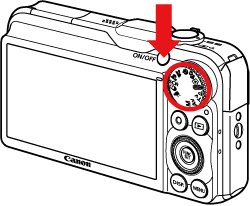
1. Press the <Power> button and Set the <Mode Dial> to ( ).
).
).
2. Press the <FUNC./SET> ( ) button.
) button.3. The following screen appears on the LCD monitor.
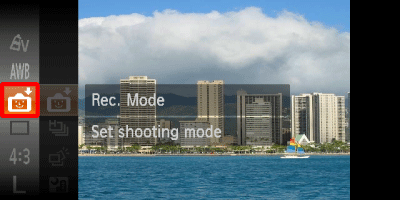
Operate the <directional buttons> up or down to select [Rec. Mode] (If no changes have been made so far, [Smart Shutter] ( ) will be displayed).
) will be displayed).Press the <FUNC./SET> () button.
) button.4. The following screen appears on the LCD monitor.
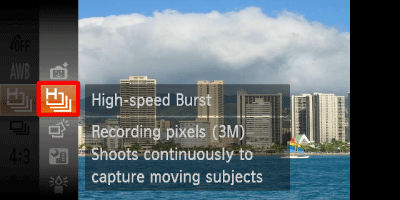
Operate the <directional buttons> up or down to select [High-speed Burst] ( ).
).
).Press the <FUNC./SET> () button.
) button.5. The following screen appears on the LCD monitor.
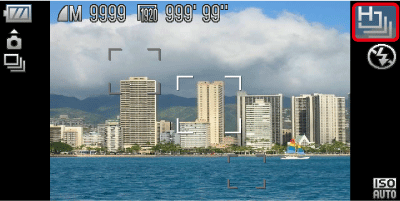
If the [High-speed Burst] () icon is displayed on the upper-right part of the screen, the setting is completed.
) icon is displayed on the upper-right part of the screen, the setting is completed.As long as you hold the <shutter button> down, the camera will shoot successive images.
When playing back images, images taken in [High-speed Burst]( ) mode are displayed in a group with only the first image displayed, however, grouped images can also be viewed individually.
) mode are displayed in a group with only the first image displayed, however, grouped images can also be viewed individually.IMPORTANT
If you erase a grouped image, all the images in the group will also be erased. Be sure to exercise adequate caution.
REFERENCE
- To view images taken in [High-speed Burst] () mode as a group, press <MENU> (
 ), and then select [On] for [Group Images] in the [Playback Menu] (
 ) tab. (By default, [On] is selected.)
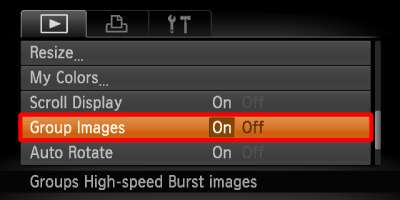
1. Press the <Playback> ( ) button.
) button.2. The last captured image will appear.
Operate the <directional buttons> left or right to choose an image that displays ( ).
).
). 3. The following screen appears.
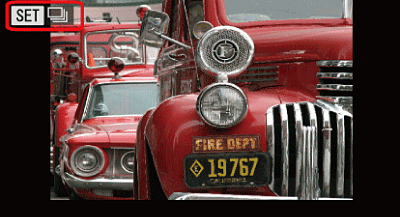
Press the <FUNC./SET> () button.
) button.4. The following screen appears.
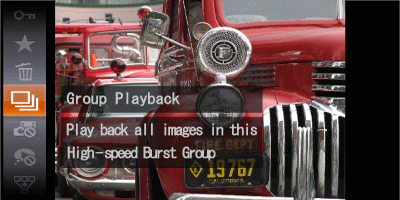
Operate the <directional buttons> up or dawn to choose ( ), then Press the <FUNC./SET> () button again.
), then Press the <FUNC./SET> () button again.5. The following screen appears.
If you Operate the <directional buttons> left or right, only the images in the group will be displayed.
After pressing the <FUNC./SET> () button, Operate the <directional buttons> up or dawn to choose (), then press the <FUNC./SET> () button again to cancel group playback.
) button, Operate the <directional buttons> up or dawn to choose (), then press the <FUNC./SET> () button again to cancel group playback.